



Issue Management System Explained: How Teams Capture, Control and Fix Business Problems
Mon, Oct 26, 2026
Arpita Roy Biswas
Business issues are a part of everyday operations. Problems such as system failures, dissatisfied customers, slow internal workflows, and employee-raised concerns can interrupt daily operations and make it harder for teams to meet their goals. When these problems are managed through emails, spreadsheets, or informal conversations, tracking their progress becomes difficult.
An Issue Management System helps businesses report, organize, assign, track, and resolve issues through a structured process. It gives teams a central place to manage issues, monitor their status, and ensure that the right people act at the right time.
Whether a business handles customer support requests, internal operational problems, or technical incidents, a well-organized system can improve visibility and accountability. This guide explains how an Issue Management System works, its key features, the role of AI, and how it differs from a traditional tracking tool.
What Is an Issue Management System?
An Issue Management System is a digital tool that gives organizations one place to handle every problem, from the moment someone raises it until it is fixed, checked and formally signed off.
Instead of relying on scattered messages or manual follow-ups, teams can record issues in one place, assign responsibilities, set priorities, and monitor progress. Each issue can have a unique reference, description, owner, status, priority level, and relevant attachments.
For example, if an employee reports that a business application is not working, the issue can be logged, categorized as a technical problem, assigned to the IT team, and tracked until it is resolved. The individual who submits a concern can follow its progress through regular status updates, without needing to reach out to the responsible team each time.
An Issue Management System can support several departments, including IT, customer support, HR, operations, administration, and project management.
Unlike a basic ticketing tool, issue management software brings issue tracking and management together in one process that includes prioritization, escalation, resolution verification, reporting, and analysis. This helps organizations understand not only which issues are open but also why they occur and how they can be prevented.
How Does an Issue Management System Work?
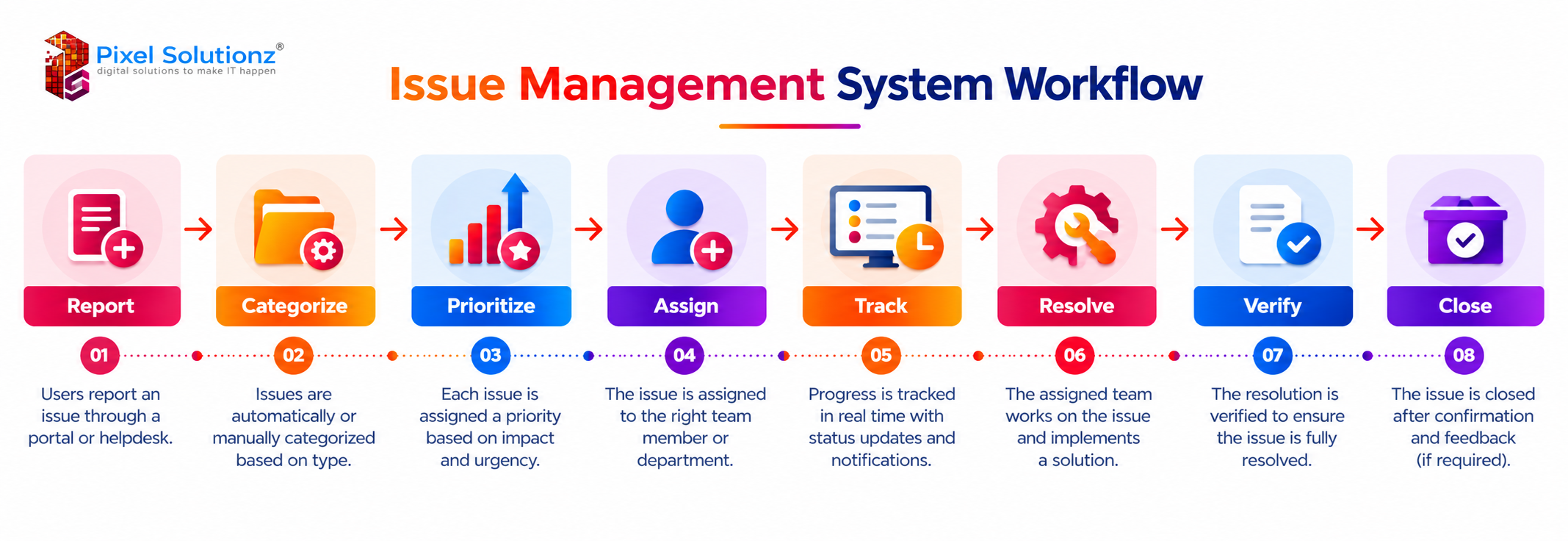
The system follows a structured workflow that helps teams handle every issue consistently.
1. Report the Issue
The process begins when a user or employee reports a problem. The report may include a description, relevant details, screenshots, or supporting documents. A centralized issue tracking system brings all reported problems into one place, helping teams maintain accurate records instead of searching through scattered emails, chats, and other communication tools.
2. Categorize the Issue
Each reported concern is labelled based on its nature, the team responsible for handling it, or the area where it originated. For example, it could be a technical error, a customer complaint, an operational delay, or a request for assistance.
3. Prioritize the Issue
Not every issue requires immediate attention. Teams assign priority levels based on urgency, business impact, and the number of users affected.
4. Assign Responsibility
The issue is assigned to the appropriate employee, department, or team. Clear ownership helps prevent confusion about who is responsible for resolving the problem.
5. Track Progress
Whoever owns the issue keeps its status current at each stage, so anyone checking in can see exactly where things stand. Managers can monitor pending tasks, identify delays, and follow up when required.
6. Resolve the Issue
The assigned team investigates the problem and takes the necessary corrective action. Relevant notes, updates, and supporting files can be recorded against the issue.
7. Verify the Resolution
A case should only be closed after the team has assessed the outcome and established that the underlying cause has been properly addressed. This reduces the risk of closing issues prematurely.
8. Close the Issue
Once the resolution is confirmed, the issue is marked as closed. The recorded history remains available for future reference, reporting, and analysis.
Key Features of an Issue Management System
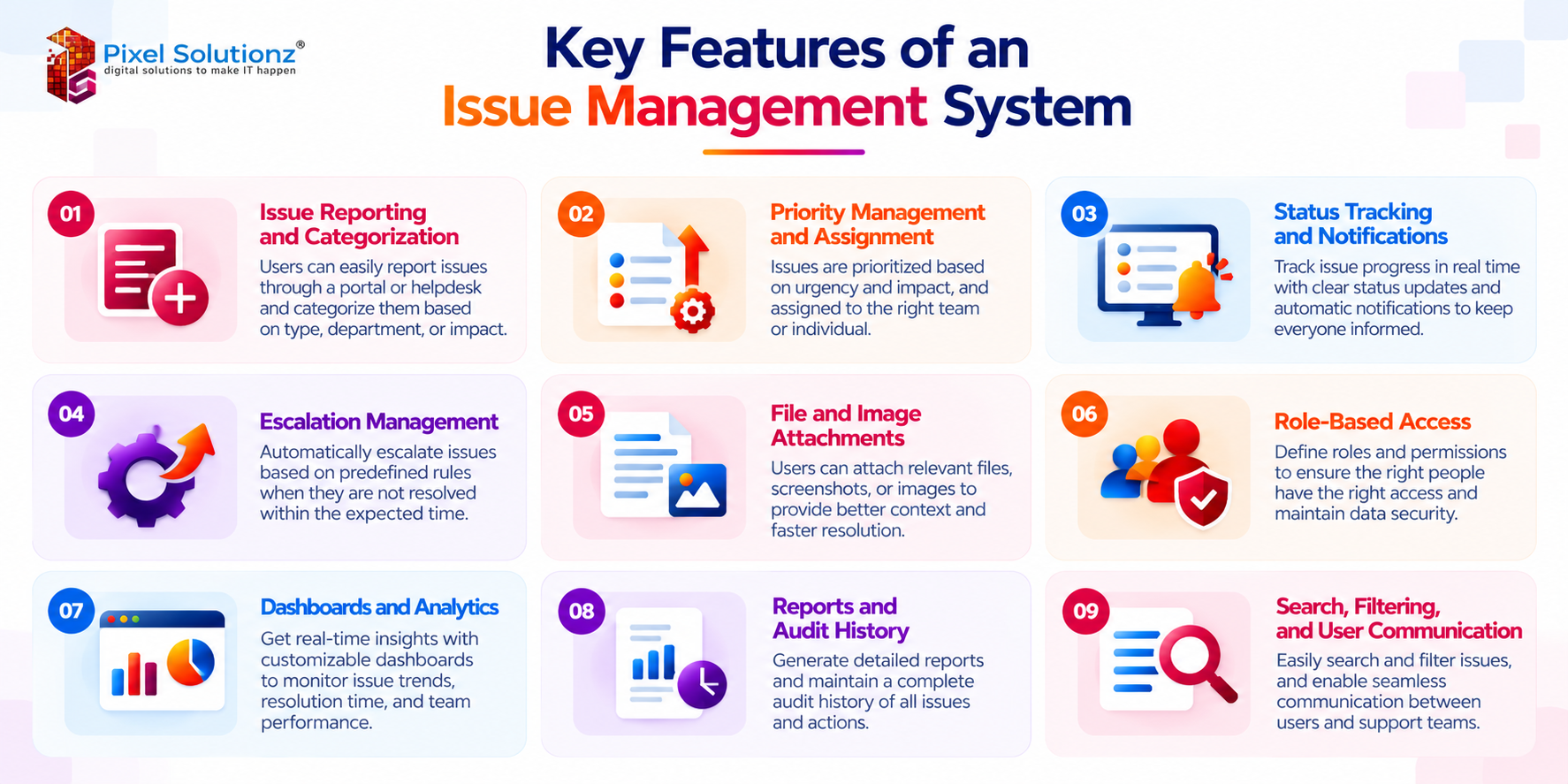
A well-designed issue management system software solution should provide the following features to help businesses manage their daily operations.
Issue Reporting and Categorization
Users should be able to report issues easily and provide the information needed for investigation. Categorization helps teams organize incoming requests and direct them to the appropriate department.
Priority Management and Assignment
Priority management helps teams focus on urgent or high-impact issues. By assigning every issue to a designated team member, the system establishes clear accountability and helps prevent tasks from being overlooked or delayed.
Status Tracking and Notifications
An effective issue tracking software solution allows users to view whether an issue is open, in progress, pending, resolved, or closed. Automatic alerts notify the appropriate people when a new issue is assigned, its progress changes, or further action is needed.
Escalation Management
Some issues remain unresolved because they require additional expertise or attention from senior staff. Escalation rules can help notify managers when an issue exceeds its expected resolution time or requires intervention.
File and Image Attachments
Screenshots, documents, images, and other supporting files help teams understand problems more clearly. This is particularly useful for technical issues and situations that require visual evidence.
Role-Based Access
Role-based access allows organizations to control who can view, create, update, assign, or close issues. This helps maintain appropriate access to business information.
Dashboards and Analytics
Dashboards provide a quick overview of open issues, overdue tasks, priority levels, and team workloads. Built-in analytics show managers which problems keep coming back and how quickly their teams turn reported issues into closed ones.
Reports and Audit History
Reports help businesses review issue volumes, resolution times, pending work, and team performance. Audit history records important changes, such as status updates, assignments, and actions taken, making it easier to review an issue’s lifecycle.
Search, Filtering, and User Communication
Search and filtering help users find issues by category, status, priority, owner, or date. Built-in communication features allow users and assigned teams to exchange updates without losing the conversation history.
Together, these features turn a business issue management system into a dependable issue resolution system, one that maintains accountability and keeps work organized across departments.
How AI Can Improve an Issue Management System
Artificial intelligence can simplify issue management by taking over routine tasks that would otherwise require repeated manual effort.
Here are some ways AI can support issue management.
Automatic issue classification: AI can analyze issue descriptions and suggest the appropriate category or department.
Priority prediction: Based on issue details and historical patterns, AI can help identify problems that may require urgent attention.
Duplicate issue detection: AI can identify similar reports, helping teams avoid investigating the same problem multiple times.
Automatic assignment: AI can recommend or assign issues to suitable team members based on issue type, expertise, or predefined rules.
Suggested solutions: The system can recommend relevant solutions from previously resolved issues or an available knowledge base.
Issue summarization: AI can summarize lengthy conversations and updates so that team members can understand the issue quickly.
SLA monitoring: AI-assisted monitoring can help identify issues approaching their expected resolution deadlines.
Automated escalation: The system can flag overdue or high-impact issues and trigger escalation according to configured rules.
Predictive issue analysis: Historical data can help identify recurring patterns and potential operational problems.
AI-generated reports: AI can summarize issue trends, recurring challenges, and performance information for management review.
These capabilities can help businesses reduce manual effort and make better use of their issue data. However, automated recommendations and assignments should be reviewed where errors could affect important business operations.
For organizations looking to introduce these capabilities, an Issue Management Platform can combine structured workflows with AI-assisted classification, reporting, and analysis.
Issue Management System vs Issue Tracking System
The two terms are often used interchangeably, but they do not always serve the same purpose.
A tracking tool primarily focuses on recording issues and monitoring their status. An Issue Management System typically covers a broader workflow, including prioritization, assignment, escalation, resolution verification, and performance analysis.
Comparison | Issue Management System | Issue Tracking System |
Main purpose | Manage the complete issue lifecycle | Record and monitor issues |
Reporting | Supports reporting and issue submission | Primarily records issues or tickets |
Assignment | Supports ownership and responsibility management | Tracks assigned issues or tickets |
Prioritization | Helps determine urgency and business impact | May provide basic priority levels |
Escalation | Supports structured escalation workflows | May offer limited escalation options |
Resolution | Tracks the complete resolution process and verification | Primarily monitors resolution status |
Analytics and governance | Supports broader reporting and process oversight | Focuses mainly on tracking and reporting |
A business that only needs to monitor technical tickets may find a basic tracking tool sufficient. However, organizations managing issues across multiple teams may benefit from an issue management solution that connects reporting, responsibility, escalation, resolution, and analysis in one workflow.
For larger organizations, an enterprise issue management system can support more complex workflows, access permissions, reporting requirements, and cross-department coordination. A custom issue management system may be suitable when standard tools do not match specific business processes or integration requirements.
When evaluating issue management software for businesses, organizations should consider their issue volume, workflow complexity, reporting needs, and the systems they already use.
Conclusion
Managing business issues effectively requires more than recording complaints or updating ticket statuses. Teams need a clear process for identifying problems, assigning responsibility, monitoring progress, and confirming that issues have been resolved.
An Issue Management System brings these activities together in one place, helping businesses improve visibility, reduce manual follow-ups, and maintain a reliable record of actions taken. With features such as priority management, notifications, escalation, dashboards, and AI-assisted analysis, it can also help teams identify recurring problems and improve their processes over time.
The right system depends on how an organization operates and the types of issues it needs to manage. Choosing a solution that fits these requirements can make issue resolution more consistent and easier to monitor.
Contact Us
FAQs
What is an Issue Management System?
An Issue Management System is software used to report, categorize, prioritize, assign, track, and resolve business issues. It helps teams manage issues through a structured workflow and maintain records of actions taken.
How does an Issue Management System work?
It follows a process that typically includes reporting an issue, categorizing it, setting its priority, assigning an owner, tracking progress, resolving the problem, verifying the outcome, and closing the issue.
What are the key features of an Issue Management System?
Common features include issue reporting, categorization, priority management, assignment, status tracking, notifications, escalation, file attachments, role-based access, dashboards, analytics, reports, audit history, search, filtering, and user communication.
What is the difference between an Issue Management System and an Issue Tracking System?
A tracking system mainly records issues and monitors their progress. An Issue Management System generally covers a wider process, including prioritization, assignment, escalation, resolution verification, and performance analysis.
Can an Issue Management System use AI to automate issue resolution?
Yes. AI can support automatic issue classification, priority prediction, duplicate detection, assignment recommendations, suggested solutions, issue summarization, SLA monitoring, escalation, and report generation. The level of automation depends on the system’s capabilities and the business requirements.
